Skip to content
Digisigns

Studio · Layout Designer

Design for screens like it's a canvas

Split any screen into zones, drop in live widgets and video, and publish at any resolution.
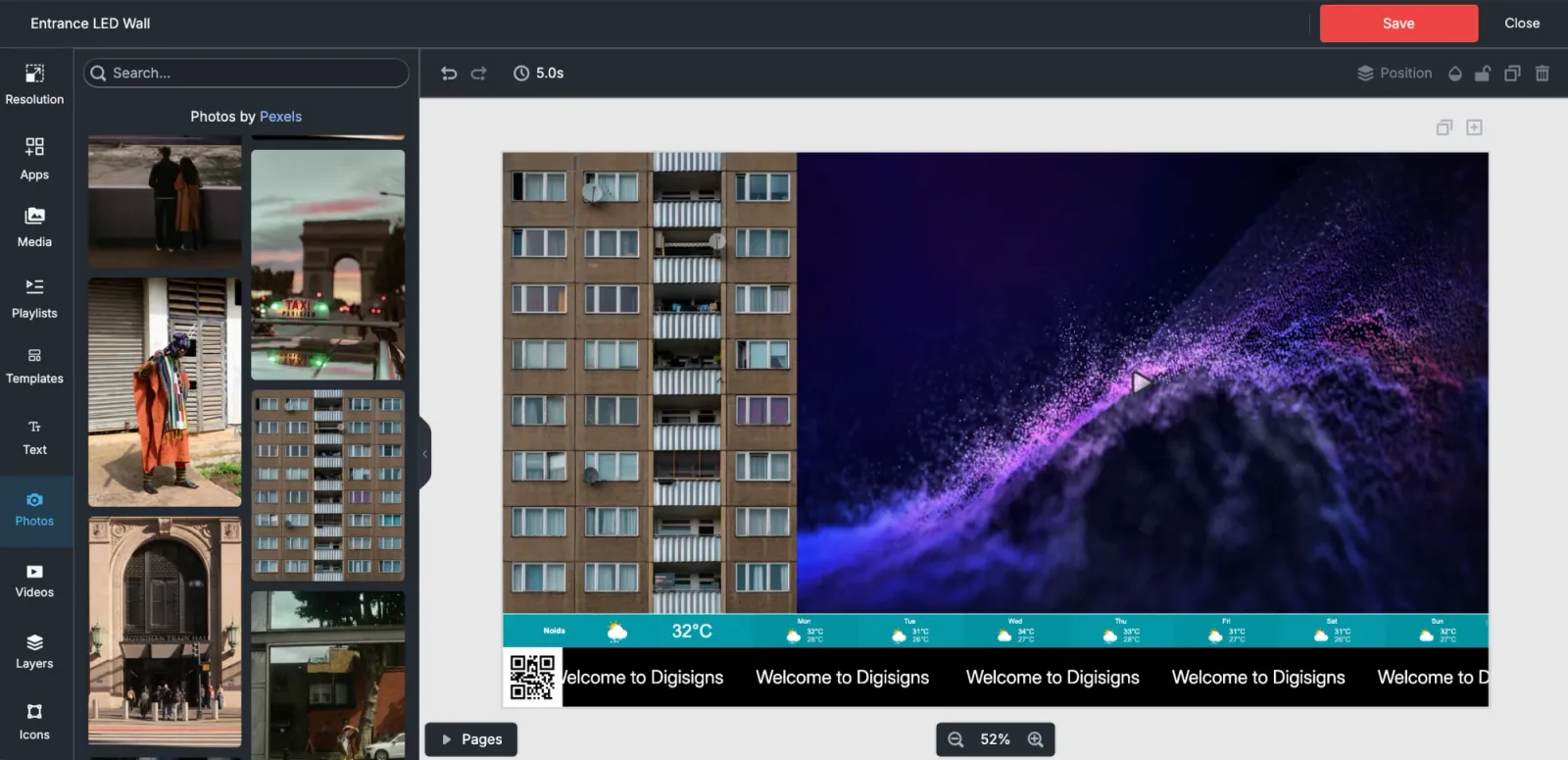
Studio layout editor with a split canvas mixing photo and video zones, a stock photo library, a live weather bar and a scrolling ticker

Zones that stay alive on their own

Live widgets keep their zone current on their own, no re-publishing, no stale screens.

Weather

Themed local forecasts in your language

Drop a live forecast into any zone and pick a theme, font, language and units to match the screen around it. It loads as a live embed rather than a static image, so updating the forecast never means re-publishing the layout.

ThemeFontLanguageMetric or imperial units

Clock

Digital & analog faces, every timezone

Give every location its own time, or one screen several timezones. Choose a black chrome or silver analog face, or a digital readout, then match the background and digit colours to your brand.

Analog or digitalFace stylesWorldwide timezonesBackground & digit colours

RSS News

Curated live feeds by topic

Pick a news source and topic, and headlines rotate through the zone on a timed cycle with title, summary and background colours you control. The player fetches and caches the feed on the device, so headlines keep rotating through brief network drops.

Curated sources & topicsSlide intervalTitle, summary & background colours

YouTube

Autoplay, loop, mute, start-time

Point the widget at a video link and control playback exactly: autoplay, loop, mute, subtitles, a start time and auto or HD resolution. It also respects the screen's global mute setting, so audio policy stays consistent across a fleet.

Autoplay & loopMute & subtitlesStart timeAuto or HD resolution

Power BI

Live, auto-refreshing reports

Embed a live Power BI report into any zone of a layout. The report renders on the screen itself and keeps refreshing, so KPIs stay current on the wall without anyone touching the display.

Instagram

Posts, reels, stories, hashtags

Show a public profile's posts, reels or stories in a styled feed. Set how many posts appear, toggle captions, likes, comments and timestamps, tune the layout, corner radius and colours, and let the refresh interval keep the feed updating on its own.

Posts, reels or storiesPost countCaption, like & comment togglesLayout, radius & coloursRefresh interval

Text Ticker

Marquee with direction & speed

A crawl line for announcements, offers and alerts. Set the text, direction and speed, choose from five font families, and style the size, text and background colours; run it as a full marquee or a fixed line.

Direction & speedFive fontsSize & coloursMarquee or fixed position

Market Ticker

Stock & index symbols, two modes

Scroll the market symbols you choose, stocks, indices or crypto pairs, in TradingView-style source:symbol format. Two display modes, dark and light themes, optional symbol logos and a transparent mode let it sit inside any layout.

Symbols listRegular or compactDark or light themeSymbol logosTransparent mode

Countdown

Columns, circles or flip styles

Count down to a launch, sale or opening in one of four styles: columns, circles, flip or flip v2. Set the target date and time, add your own message, and control the font plus separate colours for digits, labels, cards and background.

Four stylesTarget date & timeCustom messageFont & colour slots

QR Code

Generated from any URL

Type a URL and place the generated code like any other canvas element. It renders as vector art, so it stays crisp at any size, from a shelf-edge strip to an LED wall.

Any URLFreely resizable

Webpage

Embed any live site in a zone

Put a live web page inside a zone: a dashboard, a booking calendar, an internal tool. An auto-refresh interval reloads the page on the schedule you set, in minutes, so the zone tracks the source without anyone touching the screen.

Any URLAuto-refresh interval

HTML Embed

Arbitrary HTML blocks

Paste raw HTML and it renders inside the layout: custom markup, third-party embeds, snippets from other tools. The escape hatch for anything the other thirteen widgets do not cover.

Raw HTML

Events

Birthday/anniversary boards from Excel

Upload an Excel sheet of names and dates plus photos, and Studio builds celebration boards from it, using a placeholder image for anyone without a photo. Made for birthdays, anniversaries and milestones on office screens.

XLSX uploadPhotos with placeholder fallback

Screen Parting

Split the canvas into zones

Divide one canvas into zones: two-way splits, three columns, a four grid, an L-shape or fully custom sections. Each zone runs its own content, including an entire playlist playing inside one region of the screen.

Preset & custom splitsPer-zone contentPlaylists inside zones

The details designers notice

  • Playlists as canvas elements, an entire media playlist can play inside one zone of a layout.
  • Any resolution, custom canvas sizes for portrait, landscape, LED pixel maps and video walls.
  • Multi-page loops, pages with individual durations compose the total playback loop.
  • Layers & snapping, full stacking control with alignment guides, zoom and drag-drop import.
  • Auto-save, changes save on a five-second debounce, walk away mid-edit safely.
  • Multilingual editor, the editor UI ships in English, French, Indonesian, Russian and Portuguese.

Studio questions

What is Digisigns Studio?
Studio is the drag-and-drop layout designer inside Digisigns: a Canva-style canvas where you compose multi-page screen layouts from text, images, video, playlists, shapes and 14 live widgets, then publish them to screens like any other content.
Can I split one screen into multiple zones?
Yes. The Screen Parting tool divides a layout into two, three or four zones, an L-shape, or fully custom sections. Each zone holds its own content, including an entire playlist playing inside a region of the screen.
Which screen sizes and orientations does Studio support?
Any. The canvas defaults to 1920×1080 but accepts custom dimensions for portrait totems, ultra-wide LED walls, shelf strips or menu boards, content scales to the exact pixel map of your screen.
Are there templates and stock assets?
Yes, a searchable template library (filterable to your canvas size), text templates and quotes, an icon library, and stock photos, videos and backgrounds searchable in-editor via Pexels.
Do layouts support multiple pages?
Yes. Layouts can have multiple pages with per-page durations that add up to the loop length, perfect for rotating menus, announcements and promotions on one screen.
What file formats can I drop onto the canvas?
Images, SVGs, video and audio upload to your media library from the editor (large images are auto-compressed), and PDF or Excel files render as per-page images you can place like any other element.

Your screens deserve better than a slideshow

Free for 14 days on every plan. No credit card required, go live in minutes.

ISO 27001 certified · GDPR ready. Works on Android, Windows, Tizen, webOS and more.